Azure Data Factory for Healthcare Data Workflows

Introduction
Azure Data Factory (ADF) is a cloud-based ETL (Extract, Transform, Load) service that enables healthcare organizations to automate data movement, transformation, and integration across multiple sources. ADF is particularly useful for handling electronic health records (EHRs), HL7/FHIR data, insurance claims, and real-time patient monitoring data while ensuring compliance with HIPAA and other healthcare regulations.
1. Why Use Azure Data Factory in Healthcare?
✅ Secure Data Integration — Connects to EHR systems (e.g., Epic, Cerner), cloud databases, and APIs securely.
✅ Data Transformation — Supports mapping, cleansing, and anonymizing sensitive patient data.
✅ Compliance — Ensures data security standards like HIPAA, HITRUST, and GDPR.
✅ Real-time Processing — Can ingest and process real-time patient data for analytics and AI-driven insights.
✅ Cost Optimization — Pay-as-you-go model, eliminating infrastructure overhead.
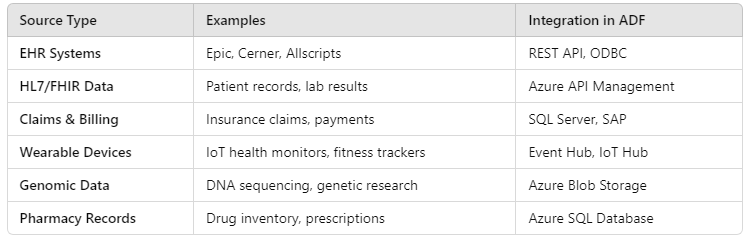
2. Healthcare Data Sources Integrated with ADF
ADF can pull data from various healthcare sources, including:
3. Healthcare Data Workflow with Azure Data Factory
Step 1: Ingesting Healthcare Data
- Batch ingestion (EHR, HL7, FHIR, CSV, JSON)
- Streaming ingestion (IoT sensors, real-time patient monitoring)
Example: Ingest HL7/FHIR data from an API
json{
"source": {
"type": "REST",
"url": "https://healthcare-api.com/fhir",
"authentication": {
"type": "OAuth2",
"token": "<ACCESS_TOKEN>"
}
},
"sink": {
"type": "AzureBlobStorage",
"path": "healthcare-data/raw"
}
}Step 2: Data Transformation in ADF
Using Mapping Data Flows, you can:
- Convert HL7/FHIR JSON to structured tables
- Standardize ICD-10 medical codes
- Encrypt or de-identify PHI (Protected Health Information)
Example: SQL Query for Data Transformation
sql
SELECT patient_id,
       diagnosis_code,
       UPPER(first_name) AS first_name,
       LEFT(ssn, 3) + 'XXX-XXX' AS masked_ssn
FROM raw_healthcare_data;
Step 3: Storing Processed Healthcare Data
Processed data can be stored in:
✅ Azure Data Lake (for large-scale analytics)
✅ Azure SQL Database (for structured storage)
✅ Azure Synapse Analytics (for research & BI insights)
Example: Writing transformed data to a SQL Database
json{
"type": "AzureSqlDatabase",
"connectionString": "Server=tcp:healthserver.database.windows.net;Database=healthDB;",
"query": "INSERT INTO Patients (patient_id, name, diagnosis_code) VALUES (?, ?, ?)"
}Step 4: Automating & Monitoring Healthcare Pipelines
- Trigger ADF Pipelines daily/hourly or based on event-driven logic
- Monitor execution logs in Azure Monitor
- Set up alerts for failures & anomalies
Example: Create a pipeline trigger to refresh data every 6 hours
json{
"type": "ScheduleTrigger",
"recurrence": {
"frequency": "Hour",
"interval": 6
},
"pipeline": "healthcare_data_pipeline"
}4. Best Practices for Healthcare Data in ADF
🔹 Use Azure Key Vault to securely store API keys & database credentials.
🔹 Implement Data Encryption (using Azure Managed Identity).
🔹 Optimize ETL Performance by using Partitioning & Incremental Loads.
🔹 Enable Data Lineage in Azure Purview for audit trails.
🔹 Use Databricks or Synapse Analytics for AI-driven predictive healthcare analytics.
5. Conclusion
Azure Data Factory is a powerful tool for automating, securing, and optimizing healthcare data workflows. By integrating with EHRs, APIs, IoT devices, and cloud storage, ADF helps healthcare providers improve patient care, optimize operations, and ensure compliance with industry regulations.
WEBSITE: https://www.ficusoft.in/azure-data-factory-training-in-chennai/


Comments
Post a Comment