Azure Data Factory for Retail Data Integration

Azure Data Factory for Retail Data Integration
Retail businesses deal with massive amounts of data from multiple sources, including point-of-sale (POS) systems, e-commerce platforms, supply chain management, customer relationship management (CRM) software, and third-party vendors. Azure Data Factory (ADF) helps integrate and manage these data pipelines efficiently by automating ingestion, transformation, and movement across cloud and on-premises environments.
1. Why Use Azure Data Factory for Retail?
Retailers benefit from ADF’s capabilities in:
✅ Automating Data Pipelines — Seamlessly move data between sources and destinations.
✅ Real-time & Batch Processing — Handle both streaming data (real-time analytics) and scheduled batch data transfers.
✅ Data Transformation & Enrichment — Use Data Flow, Mapping Data Flows, or Azure Functions to clean and enrich data.
✅ Integration with AI & Analytics — Feed integrated data into Azure Synapse, Power BI, or ML models for insights.
✅ Scalability & Cost Efficiency — Serverless model with pay-as-you-go pricing.
2. Common Retail Data Sources for ADF
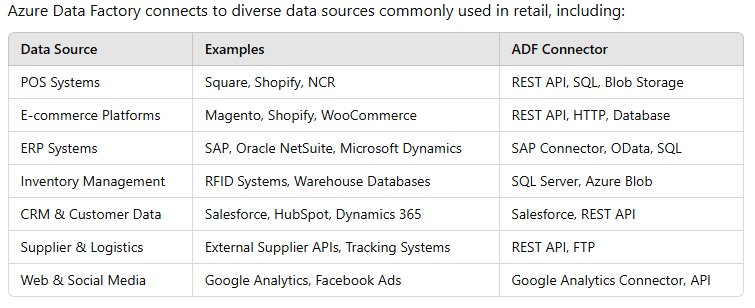
3. Building a Retail Data Pipeline with ADF
A retail data pipeline typically follows these steps:
Step 1: Data Ingestion
- Use Copy Activity to pull data from various sources (POS, e-commerce, etc.).
- Connect to Azure Blob Storage, SQL Database, Data Lake, or other destinations.
Step 2: Data Transformation
- Use Mapping Data Flows for cleaning, aggregations, and enrichment.
- Apply Data Wrangling for handling unstructured data.
Step 3: Data Storage & Integration
- Store raw and processed data in Azure Data Lake Storage (ADLS) or Azure Synapse Analytics.
- Load structured data into Azure SQL Database or Azure Cosmos DB.
Step 4: Data Consumption & Insights
- Connect ADF to Power BI, Azure Machine Learning, or Synapse for dashboards and reports.
- Automate ML-driven recommendations for personalized retail experiences.
4. Retail Use Cases for Azure Data Factory
✅ Omnichannel Analytics — Combine online and offline sales data to get a 360° customer view.
✅ Demand Forecasting — Integrate sales trends with AI models to predict stock levels.
✅ Personalized Marketing — Process CRM data to generate targeted promotions.
✅ Fraud Detection — Ingest real-time transaction data to flag suspicious activity.
✅ Supply Chain Optimization — Automate supplier and logistics data integration.
5. Best Practices for Retail Data Integration with ADF
✔ Optimize Pipeline Performance — Use partitioning and parallel processing for large datasets.
✔ Enable Error Handling & Monitoring — Implement Retry Policies, Logging, and Alerts via Azure Monitor.
✔ Secure Data Pipelines — Use Managed Identities, Azure Key Vault, and Private Endpoints.
✔ Automate & Orchestrate — Schedule pipelines using Triggers for real-time or batch processing.
Conclusion
Azure Data Factory empowers retailers to integrate and manage data efficiently, enabling real-time insights, personalized marketing, and optimized operations. By leveraging ADF’s automation, scalability, and security, businesses can streamline data workflows and unlock valuable customer and operational insights.
WEBSITE: https://www.ficusoft.in/azure-data-factory-training-in-chennai/


Comments
Post a Comment