Building Data Pipelines with Snowflake and Apache Airflow
1. Introduction to Snowflake
Snowflake is a cloud-native data platform designed for scalability and ease of use, providing data warehousing, data lakes, and data sharing capabilities. Unlike traditional databases, Snowflake’s architecture separates compute, storage, and services, making it highly scalable and cost-effective. Some key features to highlight:
- Zero-Copy Cloning: Allows you to clone data without duplicating it, making testing and experimentation more cost-effective.
- Multi-Cloud Support: Snowflake works across major cloud providers like AWS, Azure, and Google Cloud, offering flexibility in deployment.
- Semi-Structured Data Handling: Snowflake can handle JSON, Parquet, XML, and other formats natively, making it versatile for various data types.
- Automatic Scaling: Automatically scales compute resources based on workload demands without manual intervention, optimizing cost.
2. Introduction to Apache Airflow
Apache Airflow is an open-source platform used for orchestrating complex workflows and data pipelines. It’s widely used for batch processing and ETL (Extract, Transform, Load) tasks. You can define workflows as Directed Acyclic Graphs (DAGs), making it easy to manage dependencies and scheduling. Some of its features include:
- Dynamic Pipeline Generation: You can write Python code to dynamically generate and execute tasks, making workflows highly customizable.
- Scheduler and Executor: Airflow includes a scheduler to trigger tasks at specified intervals, and different types of executors (e.g., Celery, Kubernetes) help manage task execution in distributed environments.
- Airflow UI: The intuitive web-based interface lets you monitor pipeline execution, visualize DAGs, and track task progress.
3. Snowflake and Airflow Integration
The integration of Snowflake with Apache Airflow is typically achieved using the SnowflakeOperator, a task operator that enables interaction between Airflow and Snowflake. Airflow can trigger SQL queries, execute stored procedures, and manage Snowflake tasks as part of your DAGs.
- SnowflakeOperator: This operator allows you to run SQL queries in Snowflake, which is useful for performing actions like data loading, transformation, or even calling Snowflake procedures.
- Connecting Airflow to Snowflake: To set this up, you need to configure a Snowflake connection within Airflow. Typically, this includes adding credentials (username, password, account, warehouse, and database) in Airflow’s connection settings.
Example code for setting up the Snowflake connection and executing a query:
pythonfrom airflow.providers.snowflake.operators.snowflake import SnowflakeOperator
from airflow import DAG
from datetime import datetimedefault_args = {
'owner': 'airflow',
'start_date': datetime(2025, 2, 17),
}with DAG('snowflake_pipeline', default_args=default_args, schedule_interval=None) as dag:
run_query = SnowflakeOperator(
task_id='run_snowflake_query',
sql="SELECT * FROM my_table;",
snowflake_conn_id='snowflake_default', # The connection ID in Airflow
warehouse='MY_WAREHOUSE',
database='MY_DATABASE',
schema='MY_SCHEMA'
)4. Building a Simple Data Pipeline
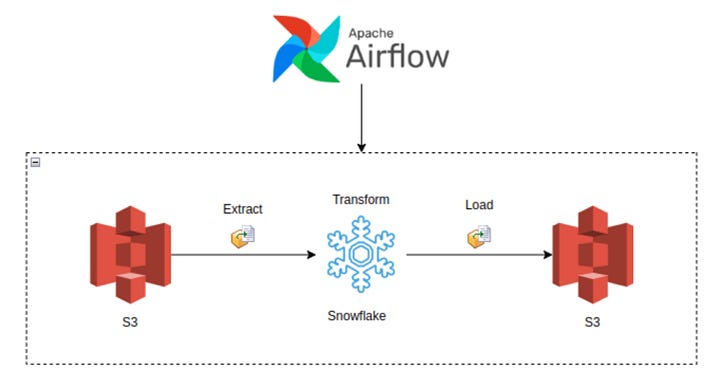
Here, you could provide a practical example of an ETL pipeline. For instance, let’s create a pipeline that:
- Extracts data from a source (e.g., a CSV file in an S3 bucket),
- Loads the data into a Snowflake staging table,
- Performs transformations (e.g., cleaning or aggregating data),
- Loads the transformed data into a production table.
Example DAG structure:
pythonfrom airflow.providers.snowflake.operators.snowflake import SnowflakeOperator
from airflow.providers.amazon.aws.transfers.s3_to_snowflake import S3ToSnowflakeOperator
from airflow import DAG
from datetime import datetimewith DAG('etl_pipeline', start_date=datetime(2025, 2, 17), schedule_interval='@daily') as dag:
# Extract data from S3 to Snowflake staging table
extract_task = S3ToSnowflakeOperator(
task_id='extract_from_s3',
schema='MY_SCHEMA',
table='staging_table',
s3_keys=['s3://my-bucket/my-file.csv'],
snowflake_conn_id='snowflake_default'
)
# Load data into Snowflake and run transformation
transform_task = SnowflakeOperator(
task_id='transform_data',
sql='''INSERT INTO production_table
SELECT * FROM staging_table WHERE conditions;''',
snowflake_conn_id='snowflake_default'
)
extract_task >> transform_task # Define task dependencies5. Error Handling and Monitoring
Airflow provides several mechanisms for error handling:
- Retries: You can set the
retriesargument in tasks to automatically retry failed tasks a specified number of times. - Notifications: You can use the
email_on_failureor custom callback functions to notify the team when something goes wrong. - Airflow UI: Monitoring is easy with the UI, where you can view logs, task statuses, and task retries.
Example of setting retries and notifications:
pythonwith DAG('data_pipeline_with_error_handling', start_date=datetime(2025, 2, 17)) as dag:
task = SnowflakeOperator(
task_id='load_data_to_snowflake',
sql="SELECT * FROM my_table;",
snowflake_conn_id='snowflake_default',
retries=3,
email_on_failure=True,
on_failure_callback=my_failure_callback # Custom failure function
)6. Scaling and Optimization
- Snowflake’s Automatic Scaling: Snowflake can automatically scale compute resources based on the workload. This ensures that data pipelines can handle varying loads efficiently.
- Parallel Execution in Airflow: You can split your tasks into multiple parallel branches to improve throughput. The
task_concurrencyargument in Airflow helps manage this. - Task Dependencies: By optimizing task dependencies and using Airflow’s ability to run tasks in parallel, you can reduce the overall runtime of your pipelines.
- Resource Management: Snowflake supports automatic suspension and resumption of compute resources, which helps keep costs low when there is no processing required.1. Introduction to Snowflake
WEBSITE: https://www.ficusoft.in/snowflake-training-in-chennai/


Comments
Post a Comment