Understanding Azure Integration Runtimes: Choosing Between Self-Hosted and Azure-Hosted Runtimes
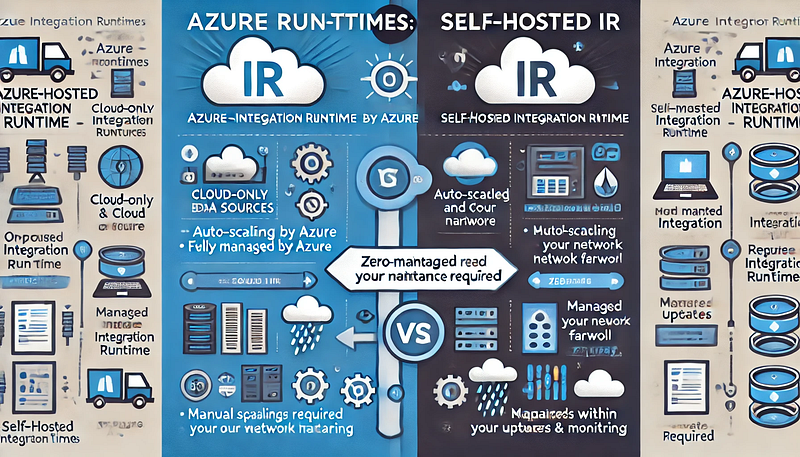
Azure Integration Runtime (IR) is a crucial component in Azure Data Factory (ADF) that enables seamless data movement, transformation, and integration across diverse data sources. Choosing between Self-Hosted Integration Runtime and Azure-Hosted Integration Runtime is essential for optimal performance, security, and cost efficiency. This guide will help you understand the key differences and determine which option best fits your data integration needs.
What is Azure Integration Runtime?
Azure Integration Runtime acts as a secure infrastructure that facilitates:
- Data movement between data stores.
- Data flow execution in Azure Data Factory.
- Dispatching activities to compute services such as Azure Databricks, Azure HDInsight, and Azure SQL Database.
Types of Integration Runtimes in Azure
There are two primary types of Integration Runtimes:
- Azure-Hosted Integration Runtime (Managed by Microsoft)
- Self-Hosted Integration Runtime (Managed by you)
Azure-Hosted Integration Runtime
The Azure-Hosted IR is a fully managed service by Microsoft, designed for cloud-native data integration.
Key Features:
✅ Easy to configure with no infrastructure management.
✅ Best suited for cloud-to-cloud data integration scenarios.
✅ Provides high availability with auto-scaling capabilities.
✅ Ideal for processing cloud-based data sources such as Azure Blob Storage, Azure SQL Database, or Amazon S3.
When to Choose Azure-Hosted IR:
- When dealing with data stored in Azure services.
- For simple data movement tasks between cloud data sources.
- When you require minimal maintenance and automatic scaling.
Self-Hosted Integration Runtime
The Self-Hosted IR is installed on your on-premises server or virtual machine, giving you full control over configuration, security, and updates.
Key Features:
✅ Required for data movement between on-premises and cloud environments.
✅ Supports network-restricted data sources, enabling secure data transfer over firewalls and VPNs.
✅ Provides greater flexibility for complex data integration pipelines.
✅ Offers enhanced security by keeping sensitive data within your internal network.
When to Choose Self-Hosted IR:
- When accessing on-premises data sources like SQL Server, Oracle, or file systems.
- For hybrid cloud scenarios where data resides across multiple environments.
- When greater control over runtime performance and security is required.
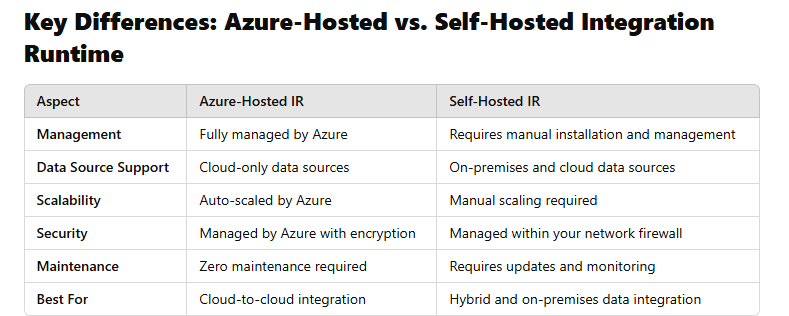
Key Differences: Azure-Hosted vs. Self-Hosted Integration Runtime
Choosing the Right Integration Runtime
To decide which runtime best suits your project, consider the following factors:
✅ Data Source Location: Use Self-Hosted IR for on-premises data sources and Azure-Hosted IR for cloud-native data integration.
✅ Network Security: Choose Self-Hosted IR when dealing with data behind firewalls or VPNs.
✅ Scalability and Maintenance: Opt for Azure-Hosted IR if you prefer minimal overhead and automatic scaling.
Conclusion
Choosing the right Integration Runtime is crucial for building efficient and secure data integration pipelines in Azure Data Factory. While Azure-Hosted IR simplifies cloud-to-cloud integration with minimal setup, Self-Hosted IR offers greater control for hybrid and on-premises data scenarios. By aligning your choice with your infrastructure, security, and scalability needs, you can ensure optimal performance for your data pipelines.
WEBSITE: https://www.ficusoft.in/azure-data-factory-training-in-chennai/


Comments
Post a Comment