Data Lake Integration with Azure Data Factory: Best Practices and Patterns
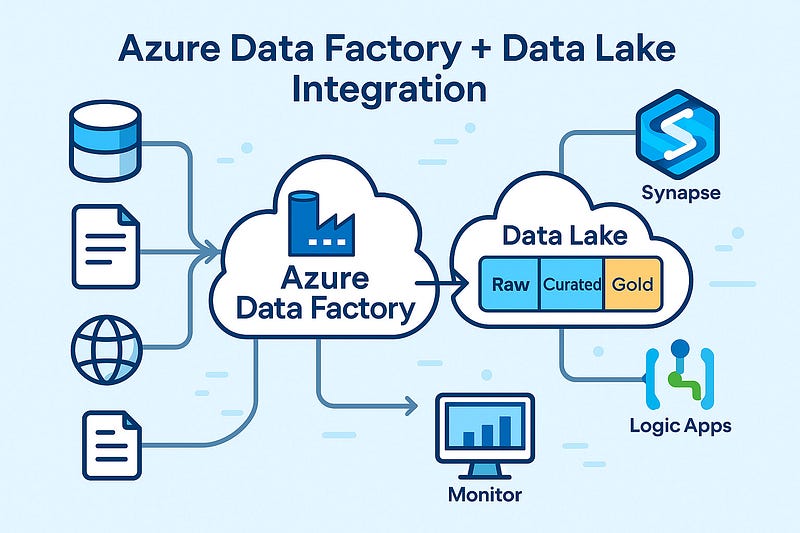
As businesses scale their data needs, Azure Data Lake becomes a go-to storage solution — offering massive scalability, low-cost storage, and high performance. When paired with Azure Data Factory (ADF), you get a powerful combo for ingesting, transforming, and orchestrating data pipelines across hybrid environments.
In this blog, we’ll explore best practices and design patterns for integrating Azure Data Lake with ADF, so you can build efficient, secure, and scalable data pipelines.
🔗 Why Use Azure Data Lake with Azure Data Factory?
- Cost-effective storage for raw and processed data
- Flexible schema support for semi-structured/unstructured data
- Seamless integration with Azure Synapse, Databricks, and Power BI
- Built-in support in ADF via Copy Activity, Mapping Data Flows, and linked services
🧱 Architecture Overview
A common architecture pattern:
pgsqlSource Systems → ADF (Copy/Ingest) → Azure Data Lake (Raw/Curated Zones)
↓
ADF Mapping Data Flows / Databricks
↓
Azure SQL / Synapse Analytics / Reporting LayerThis flow separates ingestion, transformation, and consumption layers for maintainability and performance.
✅ Best Practices for Azure Data Lake Integration
1. Organize Your Data Lake into Zones
- Raw Zone: Original source data, untouched
- Curated Zone: Cleaned and transformed data
- Business/Gold Zone: Finalized datasets for analytics/reporting
Use folder structures like:
swift/raw/sales/2025/04/10/
/curated/sales/monthly/
/gold/sales_summary/💡 Tip: Include metadata such as ingestion date and source system in folder naming.
2. Parameterize Your Pipelines
Make your ADF pipelines reusable by using:
- Dataset parameters
- Dynamic content for file paths
- Pipeline parameters for table/source names
This allows one pipeline to support multiple tables/files with minimal maintenance.
3. Use Incremental Loads Instead of Full Loads
Avoid loading entire datasets repeatedly. Instead:
- Use Watermark Columns (e.g., ModifiedDate)
- Leverage Last Modified Date or Delta files
- Track changes using control tables
4. Secure Your Data Lake Access
- Use Managed Identities with RBAC to avoid hardcoded keys
- Enable Access Logging and Firewall Rules
- Implement Private Endpoints for data lake access inside virtual networks
5. Monitor and Handle Failures Gracefully
- Enable Activity-level retries in ADF
- Use custom error handling with Web Activities or Logic Apps
- Integrate Azure Monitor for alerts on pipeline failures
📐 Common Patterns for Data Lake + ADF
Pattern 1: Landing Zone Ingestion
ADF pulls data from external sources (SQL, API, SFTP) → saves to /raw/ zone.
Best for: Initial ingestion, batch processing
Pattern 2: Delta Lake via Data Flows
Use ADF Mapping Data Flows to apply slowly changing dimensions or upserts to data in the curated zone.
Pattern 3: Metadata-Driven Framework
Maintain metadata tables (in SQL or JSON) defining:
- Source system
- File location
- Transformations
- Schedul
ADF reads these to dynamically build pipelines — enabling automation and scalability.
Pattern 4: Hierarchical Folder Loading
Design pipelines that traverse folder hierarchies (e.g., /year/month/day) and load data in parallel.
Great for partitioned and time-series data.
🚀 Performance Tips
- Enable Data Partitioning in Data Flows
- Use Staging in Blob if needed for large file ingestion
- Tune Data Integration Units (DIUs) for large copy activities
- Compress large files (Parquet/Avro) instead of CSVs when possible
🧠 Wrapping Up
When used effectively, Azure Data Factory + Azure Data Lake can become the backbone of your cloud data platform. By following the right patterns and best practices, you’ll ensure your pipelines are not only scalable but also secure, maintainable, and future-ready.
WEBSITE: https://www.ficusoft.in/azure-data-factory-training-in-chennai/


Comments
Post a Comment